
DynamoDB GUI Client
DocKit is an open source DynamoDB desktop app for Mac, Windows, and Linux. It replaces the AWS Console for daily work. You get a PartiQL editor, visual query builder, and an AI assistant in one native application.
Why a dedicated GUI?
The AWS Console is fine for quick lookups, but it wasn't built for development. It lacks query history and offline support. Writing filter expressions in a tiny text box is slow and prone to errors. Dedicated clients exist to fix these specific problems.
DocKit includes a data AI agent that understands your table schema. You describe what you need in plain English — the agent reads your schema, generates PartiQL, and runs it against your table through tools it has verified it can use.
See DocKit in action
Features
PartiQL editor
The editor is powered by Monaco and built for DynamoDB.
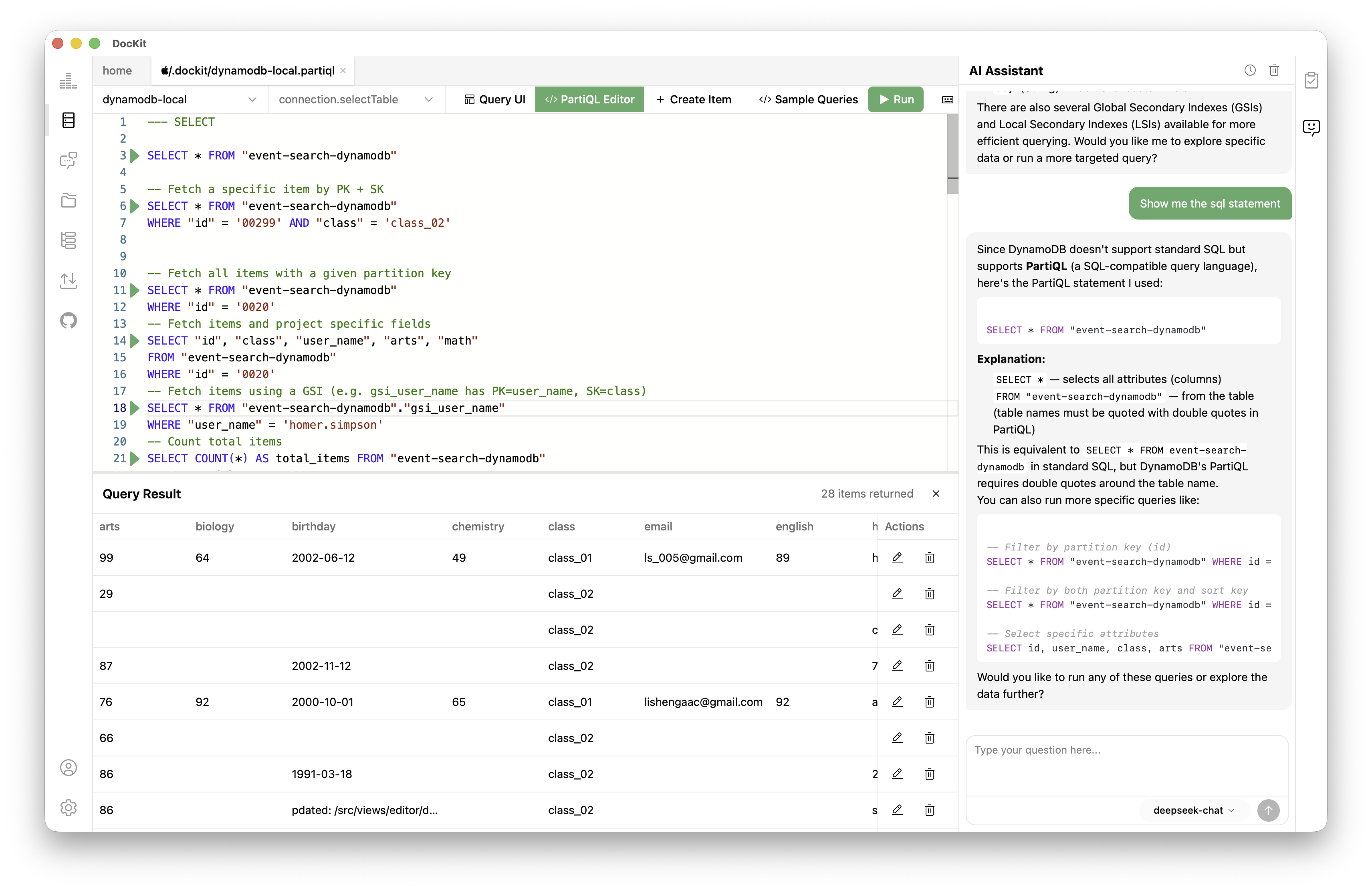
- Syntax highlighting and validation for PartiQL statements.
- Autocomplete suggests table names, attribute names, and types from your live environment.
- Run multiple queries in one session.
- Use
Cmd/Ctrl + Enterto execute and see results in a structured table.
Visual query builder
If you don't want to write PartiQL manually, use the visual builder.
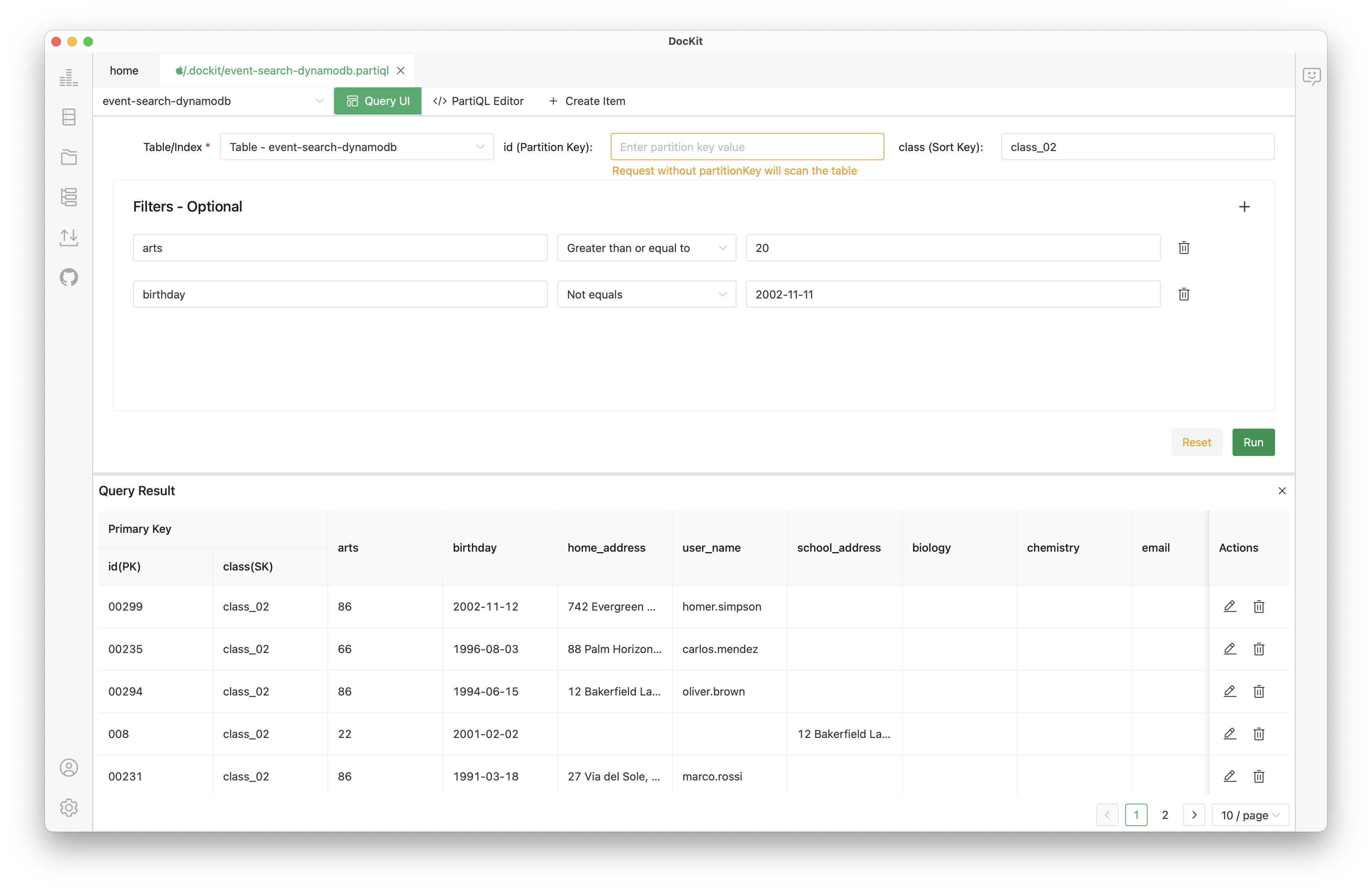
- Pick a table from the sidebar.
- Set partition keys, sort key conditions, and filter expressions through form fields.
- Preview the generated query before running it.
- Switch to the PartiQL view at any time to edit the underlying statement.
Visual queries are saved to your history automatically.
Data AI agent — Agentic Data Studio
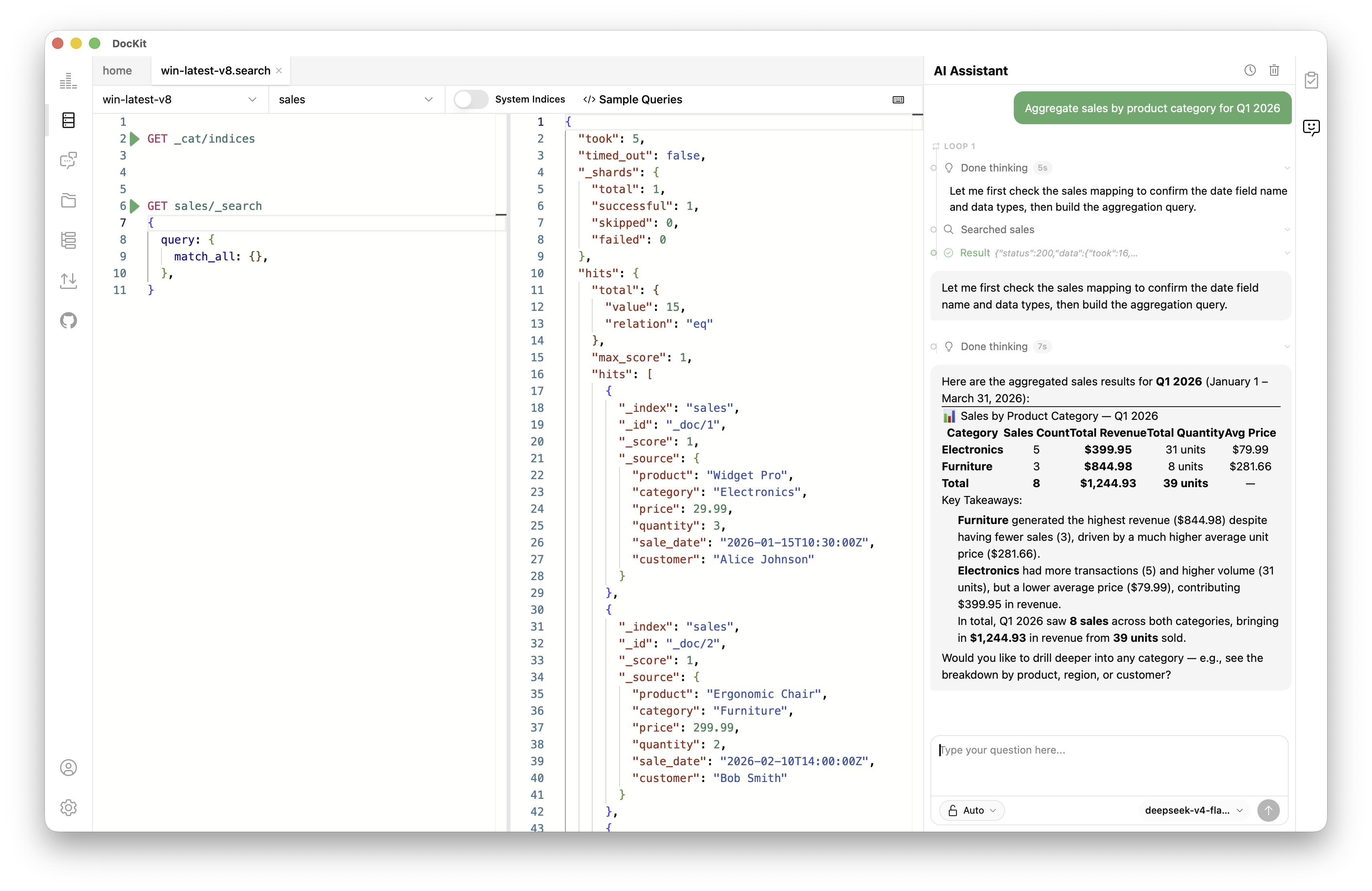
The sidebar AI assistant and Agentic Data Studio have access to your connection, table schema, indexes, and query history. When you ask for something, they read live context from your DynamoDB connection, build the PartiQL, and can run it against your table through verified tools.
Ask "find orders over $500 from last week" — the agent reads your table schema, constructs the query, runs it, and shows you results. Ask "describe the table capacity" — it calls DescribeTable and returns structured metrics.
Read operations run automatically. Write operations (update, delete) require explicit confirmation. Your credentials are never sent to the LLM.
Import and export
Move data without losing type information.
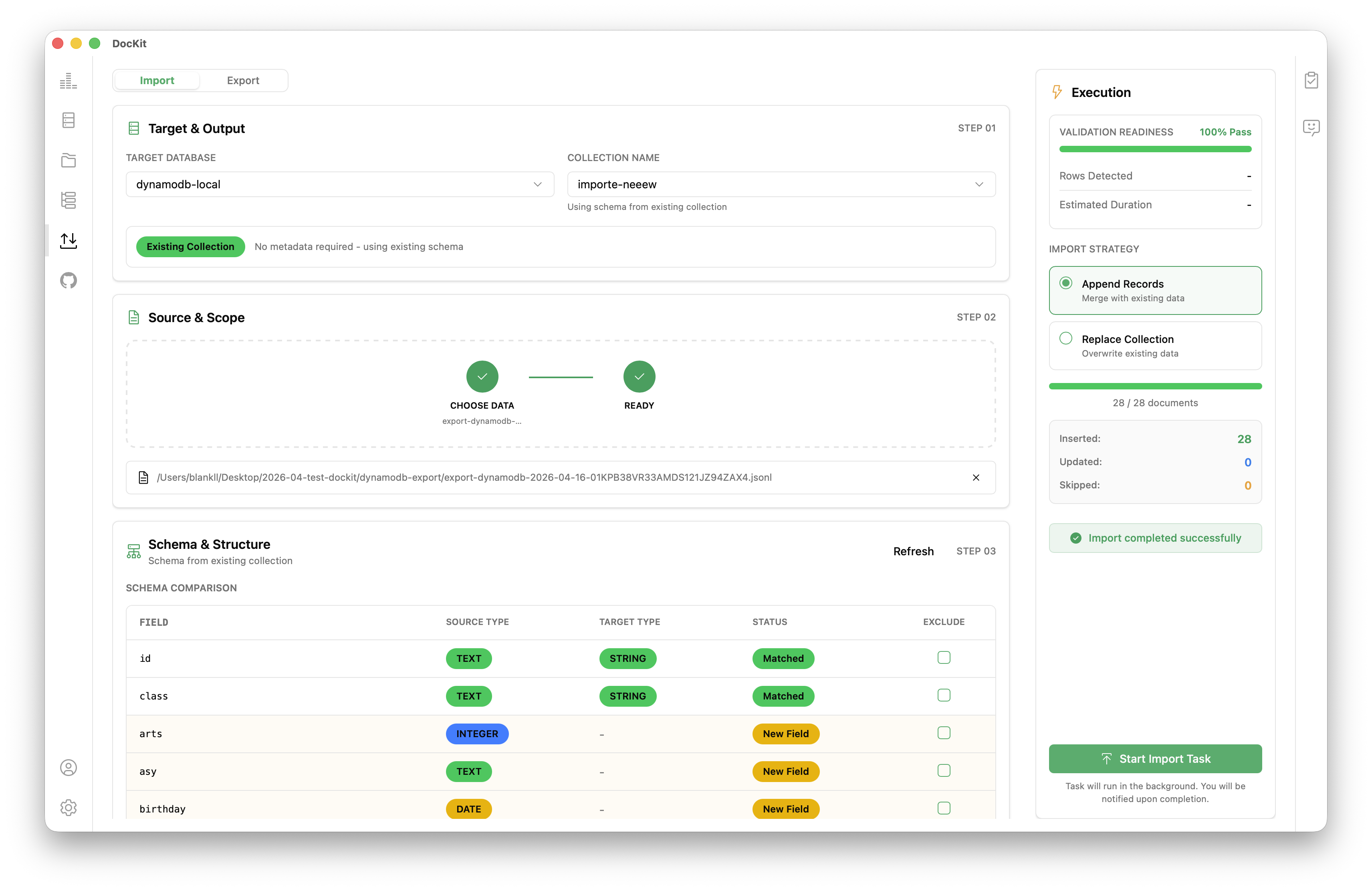
- JSON format preserves DynamoDB types like S, N, BOOL, and Maps.
- CSV support for spreadsheets and analytics.
- Uses the
BatchWriteItemAPI with built-in rate limiting and retries. - Export large tables with cursor-based pagination to avoid memory limits.
Query history
DocKit saves every PartiQL statement and visual query. You can search, re-run, or load them back into the editor. This history is stored locally and scoped to your connection.
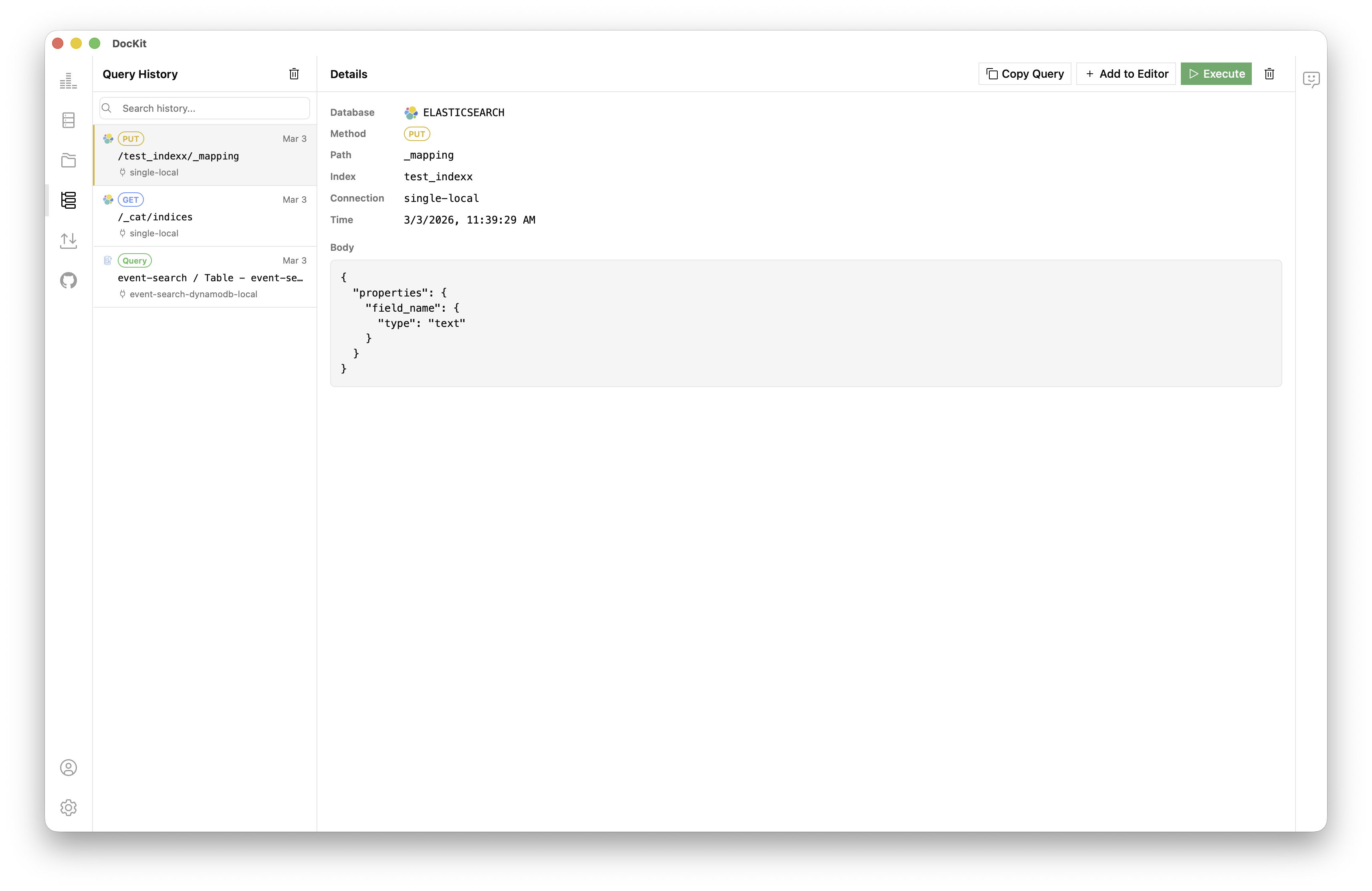
Multi-database support
DocKit also works with Elasticsearch and OpenSearch. You can switch between DynamoDB tables and search clusters without changing tools.
 DynamoDB
 Elasticsearch
 OpenSearch
Comparison
| DocKit | AWS Console | NoSQL Workbench | Dynobase | |
|---|---|---|---|---|
| Platform | Desktop (native) | Web (browser) | Desktop | Desktop |
| PartiQL editor | Monaco | Basic | Yes | Yes |
| Visual query builder | Yes | Limited | Yes | Yes |
| AI assistant | Yes | No | No | No |
| Query history | Auto | No | No | Yes |
| Import / Export | JSON, CSV | Limited | Limited | Yes |
| Offline mode | Yes | No | Yes | Yes |
| Elasticsearch support | Yes | No | No | No |
| Open source | Apache 2.0 | No | No | No |
| Price | Community: free · Ultimate $9.9/mo | Free | Free | $12–30/mo |
Getting started
- Download DocKit for macOS, Windows, or Linux.
- Open the app and click New Connection. Select DynamoDB.
- Enter your AWS region and credentials, or use an existing IAM profile.
- Click Connect to see your tables in the sidebar.
- Start querying with the PartiQL editor or Visual Query Builder.
To connect to DynamoDB Local, set the endpoint to http://localhost:8000. Use any non-empty credentials. Check the connection guide for details.
Table Management
DocKit provides full DynamoDB table lifecycle management from the Manage panel.
Viewing Tables
Browse all tables with key metadata: item count, size, status, billing mode, partition key, sort key, and index count.
Creating Tables
A 4-step Create Table Wizard:
- Basic Info — Table name, partition key (type: string/binary/number), sort key (optional)
- Capacity Settings — On-demand or Provisioned (RCU/WCU)
- Indexes & Streams — Configure GSIs (key schema, projection type, throughput), LSIs, and DynamoDB Streams (keys_only/new_image/old_image/new_and_old_images)
- Review — Summary of all settings before creation
Modifying Tables
- Billing mode: Switch between On-demand and Provisioned
- Table class: Standard or Standard-IA (Infrequent Access)
- Auto Scaling: Configure read/write capacity min/max/target
- GSI management: Create, update throughput, or delete Global Secondary Indexes
- TTL: Enable/disable Time-to-Live with attribute selection
- Point-in-Time Recovery: Enable/disable continuous backups (PITR)
- Streams: Enable/disable/change stream view type
- Encryption: AWS-owned vs KMS vs Customer-managed CMK
- Deletion Protection: Prevent accidental table deletion
- Tags: Manage key-value metadata tags
Monitoring
View CloudWatch metrics directly in the app for the last 24 hours:
- Read/Write capacity utilization
- Throttled events
- Consumed RCU/WCU
Advanced Operations
- Truncate table: Delete all items preserving table schema and settings
- Delete table: Permanently remove table and all data
GSIs and LSIs
DocKit lets you create, view, and delete indexes. For each index you can see:
- Index name, type (GSI/LSI), status (active/creating/deleting/updating)
- Key schema (partition key + optional sort key)
- Projection type (ALL, KEYS_ONLY, INCLUDE)
- Throughput settings (provisioned only)
- Item count and storage size
Create indexes with a dialog that configures key schema, projection, and throughput in one flow.
PartiQL Query Patterns
DocKit's DynamoDB editor has both a visual query builder and a PartiQL SQL editor. Here's when each one makes sense.
Basic table queries with PartiQL
Say you have an Orders table with OrderId (partition key) and CreatedAt (sort key):
Query by partition key — the fastest way to get data:
SELECT *
FROM "Orders"
WHERE "OrderId" = 'ORD#10001';
Query by partition key and sort key condition — narrower reads within a known range:
SELECT "OrderId", "CreatedAt", "Status", "Total"
FROM "Orders"
WHERE "OrderId" = 'ORD#10001'
  AND "CreatedAt" BETWEEN '2026-05-01T00:00:00Z' AND '2026-05-31T23:59:59Z';
Scan with a filter expression — for when the access pattern wasn't modeled as a key:
SELECT *
FROM "Orders"
WHERE "Status" = 'PENDING'
  AND "Total" >= 500;
If Status and Total aren't part of any key, DynamoDB has to scan everything first and filter after. Works for small tables or local dev, but don't rely on it in production.
GSI queries
Global Secondary Index queries need an explicit index hint. If Orders has a GSI called CustomerId-CreatedAt-index:
SELECT "OrderId", "CustomerId", "CreatedAt", "Status", "Total"
FROM "Orders"."CustomerId-CreatedAt-index"
WHERE "CustomerId" = 'CUST#42'
  AND "CreatedAt" >= '2026-05-01T00:00:00Z';
DynamoDB needs to know which storage path to use. The index hint makes that explicit.
Batch operations
PartiQL handles maintenance work well — seeding data, fixing rows, cleaning up after tests:
INSERT INTO "Orders" VALUE {
  'OrderId': 'ORD#10002',
  'CreatedAt': '2026-05-15T09:30:00Z',
  'CustomerId': 'CUST#42',
  'Status': 'PENDING',
  'Total': 149.99
};

UPDATE "Orders"
SET "Status" = 'PAID', "Total" = 159.99
WHERE "OrderId" = 'ORD#10002'
  AND "CreatedAt" = '2026-05-15T09:30:00Z';

DELETE FROM "Orders"
WHERE "OrderId" = 'ORD#10002'
  AND "CreatedAt" = '2026-05-15T09:30:00Z';
You can run multiple statements in one session for maintenance tasks.
Visual Query Builder
Build DynamoDB queries through an intuitive UI form — set partition keys, sort key conditions, and filters without writing code.
Pagination
Query results are paginated with configurable page sizes: 10, 25, 50, 100, 200, or 300 items per page. Navigate forward/backward through result sets.
Inline Item CRUD
Edit items directly in the result table:
- Create: Add new items with attribute editor (type selection: S, N, BOOL, L, M, etc.)
- Edit: Modify attribute values inline
- Delete: Remove items with confirmation dialog
FAQ
Is DocKit an alternative to Dynobase? Yes. It handles the same core workflows like browsing tables and running PartiQL. It adds an AI assistant and support for Elasticsearch and OpenSearch. It is open source under Apache 2.0.
Does it support DynamoDB Local? Yes. Set the custom endpoint to http://localhost:8000 when creating the connection.
Can I replace NoSQL Workbench with this? For queries and data operations, yes. NoSQL Workbench has a better data modeler, so you might want to use both if you do heavy modeling.
Where are AWS credentials stored? They are stored locally on your machine. They are never sent to third parties or DocKit's developers.
Can I manage DynamoDB tables in DocKit? Yes. DocKit provides full table lifecycle management — create with a 4-step wizard, modify billing mode, indexes, streams, TTL, PITR, encryption, and more. You can also truncate, delete, and monitor CloudWatch metrics directly in the app.
→ DocKit full feature overview · DynamoDB query patterns guide · Best DynamoDB GUI clients 2026 · Import & Export guide