
SqlKit Open-source SQL database GUI
Browse tables, run queries, and export results from MySQL, PostgreSQL, SQL Server, Oracle, and more. Available for macOS, Windows, and Linux.
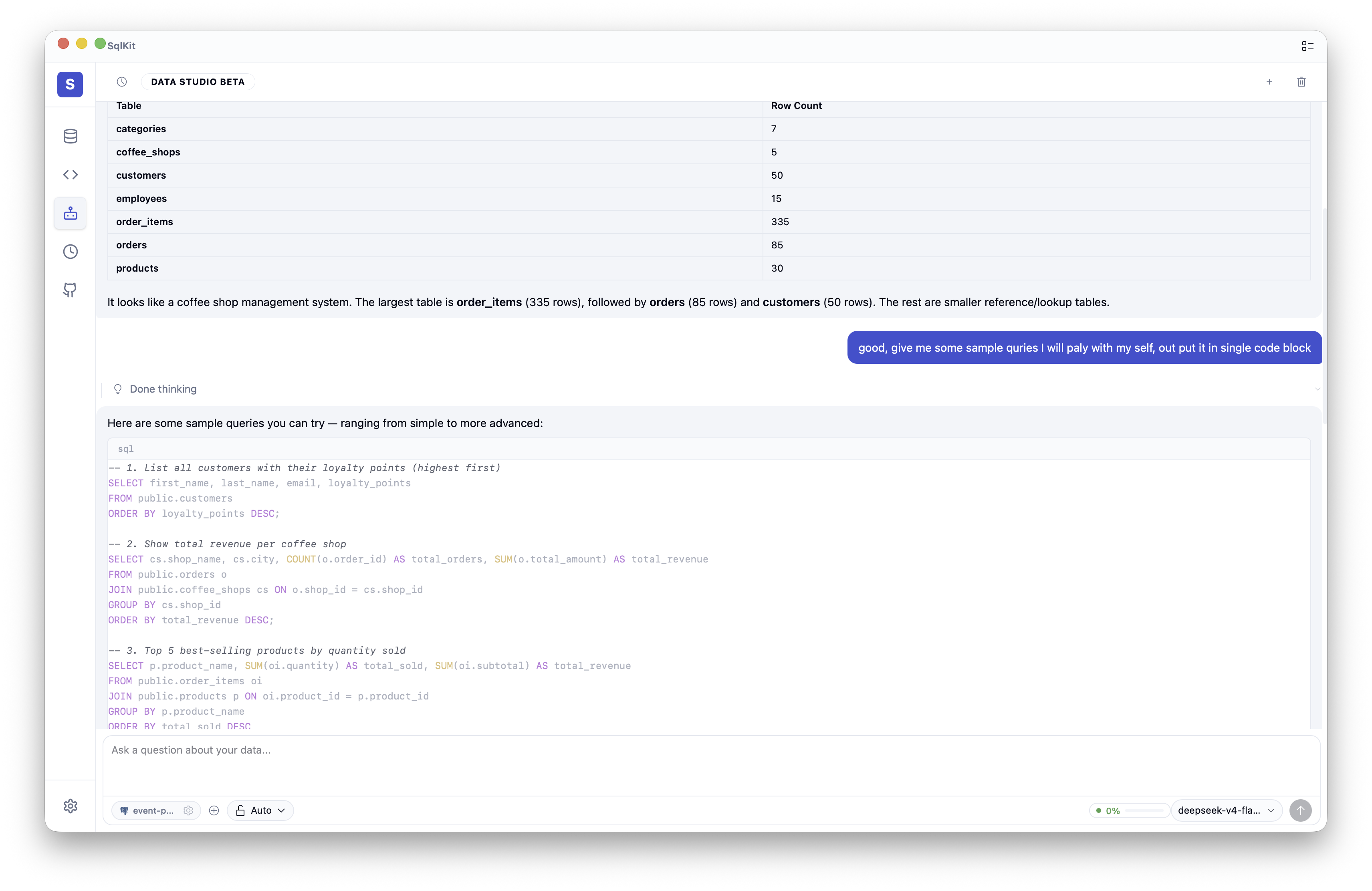
Agentic Data Studio
Tell it what you need. It reads your schema, writes queries, explains execution plans, and fixes errors. Works with OpenAI, Anthropic, DeepSeek, and Ollama. Bring your own key — credentials stay on your machine.
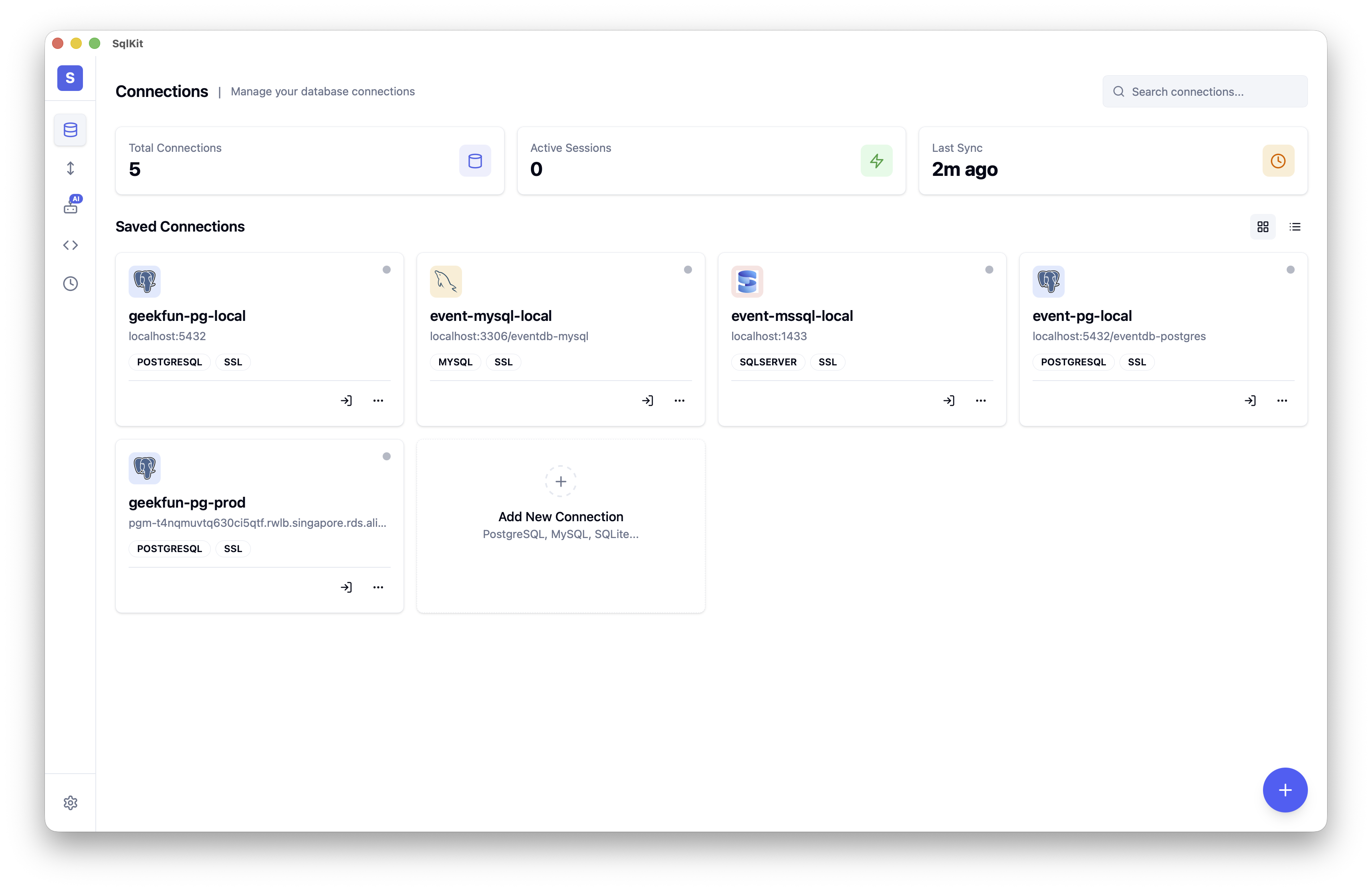
Connect to the databases you use
Connect to PostgreSQL, MySQL, SQL Server, and SQLite with built-in drivers. SqlKit uses JDBC for Oracle and DuckDB, wire-compatible drivers for databases such as MariaDB and CockroachDB, and HTTP for ClickHouse, Trino, and Presto.
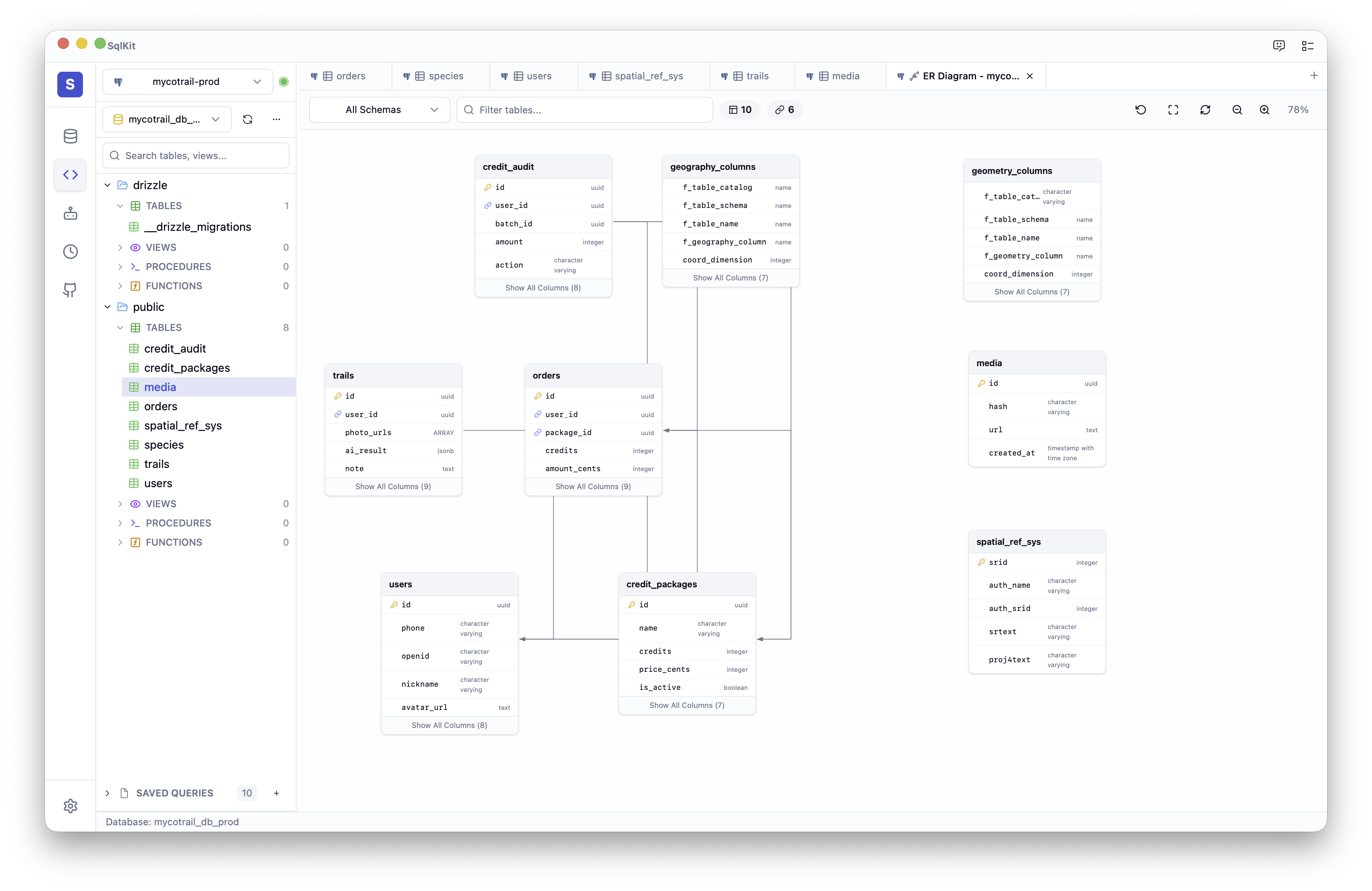
Browse & Visualize Your Data
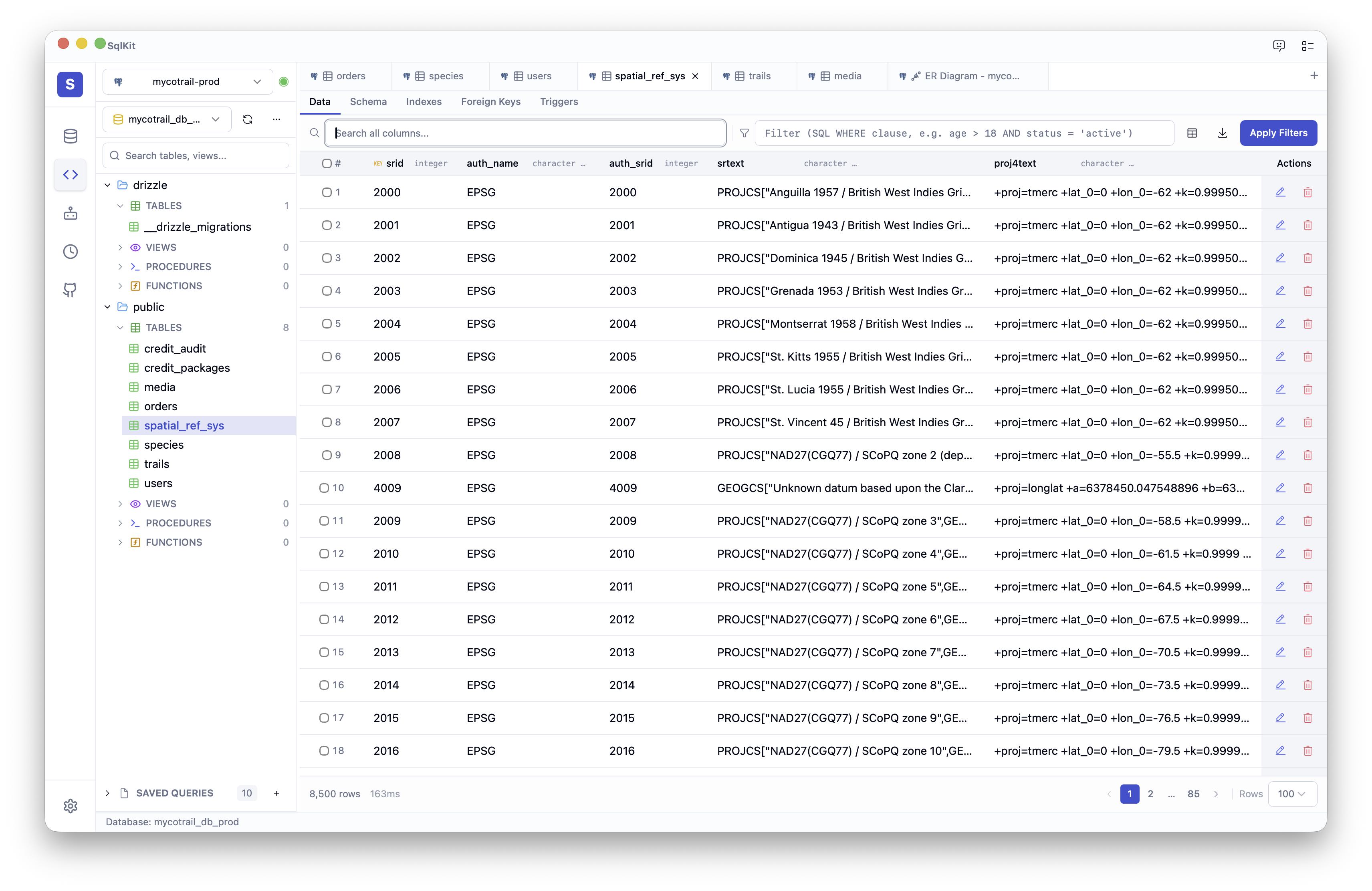
Tree view of databases, schemas, tables, and columns. Virtual-scrolled data grid with sort, filter, and inline editing. ER diagrams for schema relationships. DDL viewer, object search — everything you need to explore your data.
Enterprise Connectivity
SSH tunnels with key or password auth. SSL/TLS. Credentials in your OS keychain. Auto-reconnect keeps things running when connections drop.
Supported databases
















































What you can do with SqlKit
Explore the capabilities guideConnect to your databases
Save server connections and open local database files. See which profiles use built-in drivers, JDBC, or HTTP.
Write and troubleshoot SQL
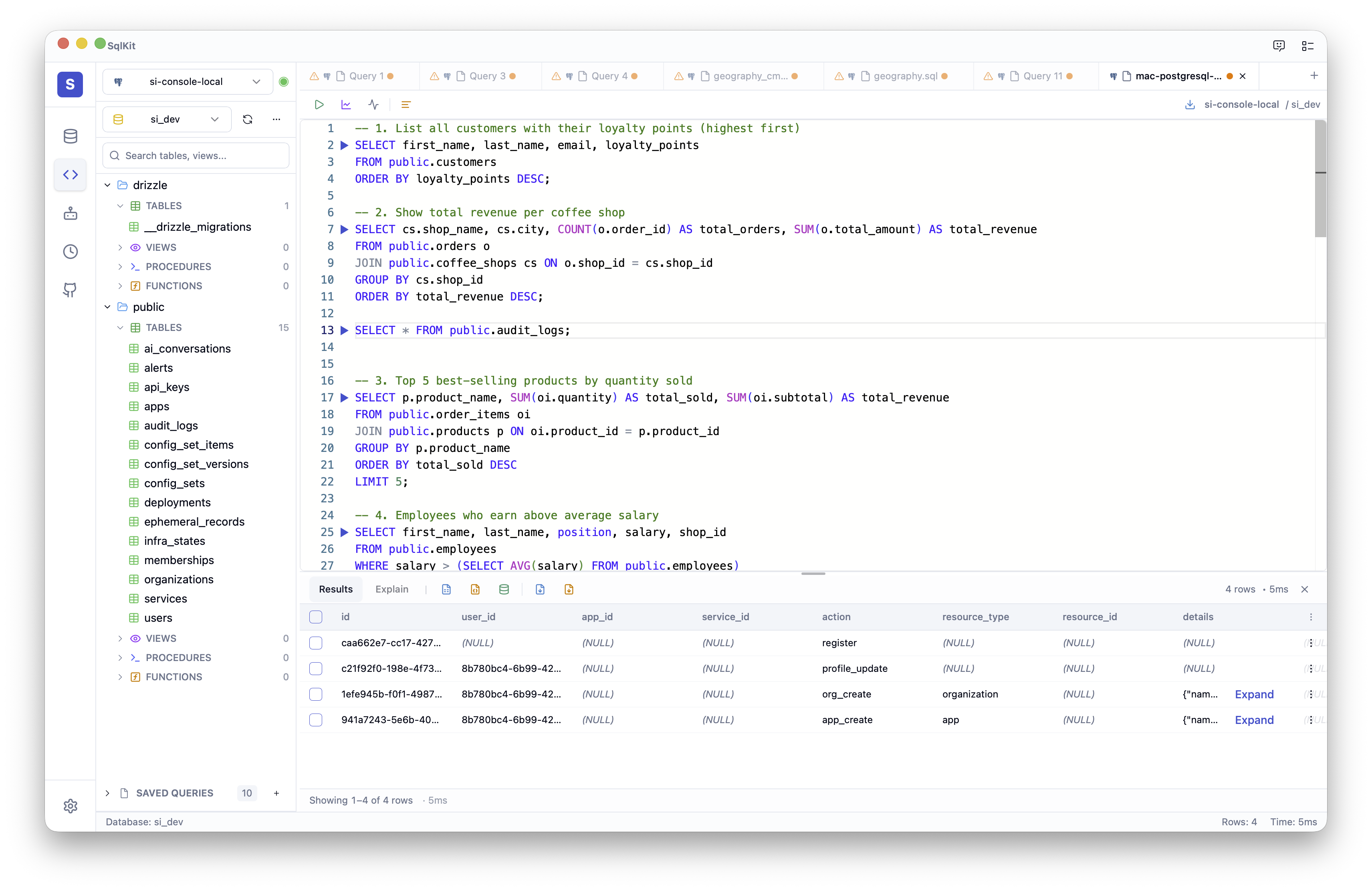
Run a statement or a selection, save queries, and inspect execution plans on supported engines.
Explore schemas and relationships
Open table definitions to inspect columns, keys, and indexes. Use ER diagrams in Ultimate to follow foreign keys.
Edit rows and move data
Filter and edit data on supported engines. Export query results, or use Transfer in Ultimate to import files and export tables.
Draft queries with AI
In Ultimate, connect your own model to Agentic Data Studio and review SQL drafted with your schema context.
Connect coding agents with MCP
Use the Ultimate MCP Bridge and Data Studio Agent to share selected connections with tools such as Codex.
Agentic Data Studio
SqlKit's Agentic Data Studio lets you work with databases without writing SQL from scratch. Describe what you need, the agent reads your schema, writes queries, optimizes slow ones, explains execution plans, and fixes errors.
- Natural language to SQL — schema-aware context generation with your actual table and column names
- SQL optimization — rewrite slow queries and visualize execution plans as structured trees with cost highlights
- Error fixing — agent diagnoses and fixes SQL errors automatically
- Safety — per-source permissions and explicit confirmation for destructive operations; credentials never exposed to the LLM
- Bring your own key — supports OpenAI, Anthropic, DeepSeek, Ollama, and LM Studio. Fully offline with local models.
Multi-Database Architecture
Check supported databases and drivers to see how to connect to your database.
| Strategy | Databases |
|---|---|
| Native (Rust) | PostgreSQL, MySQL, SQL Server, SQLite |
| PG-wire compat | CockroachDB, Redshift, YugabyteDB, TimescaleDB, QuestDB, Vastbase, and more |
| MySQL-wire compat | MariaDB, TiDB, OceanBase, StarRocks, Databend, ManticoreSearch, and more |
| JDBC bridge | Oracle, DuckDB, Firebird, Snowflake, DB2, H2, BigQuery, Databricks, Hive, Hana, Teradata, Vertica, Exasol, Informix, Cassandra, TDengine, and more |
| HTTP bridge | ClickHouse, Trino, Presto, rqlite, Turso |
Designed for Developers
| vs. | SqlKit | DBeaver | DataGrip | Navicat |
|---|---|---|---|---|
| AI agent | ✅ Native | ❌ Plugin | ❌ | ❌ |
| Native performance | ✅ Rust + Tauri | ❌ Java/Electron | ❌ JVM | ❌ C++ |
| SSH tunnel | ✅ | ✅ | ✅ | ✅ |
| JDBC bridge | ✅ | ✅ | ❌ | ✅ |
| Open source | ✅ Apache 2.0 | ✅ GPL | ❌ | ❌ |
| Price | Community: free · Ultimate USD 9.90/mo | Free | $199/yr | $199+ |
| macOS / Windows / Linux | ✅ | ✅ | ✅ | Partial |
Everyday features
- Multi-tab editing — work on multiple queries simultaneously with familiar tab management
- Schema browser — tree view of databases, schemas, tables, columns, indexes, views, procedures, and functions
- Virtual data grid — sort, filter, search inline, edit records, and export results to CSV, JSON, or Markdown
- Query history — auto-saved, searchable, replayable. Saved queries with file management and platform-aware shortcuts
- ER diagrams — interactive relationship visualization with smart graph layout
- SQL formatting — configurable dialect and style with
Shift+Alt+F - DDL viewer — inspect CREATE statements for any object in your database
- Object search — quickly find tables, views, and procedures across any schema
- Dark mode — built-in theme system with light and dark variants
Connectivity & Security
- SSH tunnel — connect through SSH with key or password authentication
- Encrypted storage — credentials secured by OS keychain (macOS Keychain, Windows Credential Manager, Linux Secret Service)
- SSL/TLS — encrypted connections to supported databases
- HTTP proxy — configurable proxy for LLM provider connections
- Auto-reconnect — resilient connection handling
- Auto-update — automatic update checks via GitHub Releases (configurable)
Frequently asked questions
What databases does SqlKit support? Use SqlKit with PostgreSQL, MySQL, SQL Server, Oracle, SQLite, and other SQL databases and data warehouses. The database and driver guide explains what you need to connect to each one.
Is SqlKit really free? Yes. The Community edition is free and open source (Apache 2.0), and it includes the full local database workflow with no connection limits. Advanced capabilities (AI agent with your own LLM, MCP, cluster management, ER diagrams, bulk import/export, and cross-device sync) are part of the paid GEEKFUN Data Studio Ultimate subscription (USD 9.90/month or USD 99.00/year, with a 7-day free trial). Every version released while you're subscribed stays yours even if you cancel later.
Does SqlKit work offline? Database operations work fine offline. AI features need network access to your model endpoint, or you can run a local model via Ollama or LM Studio.
Does SqlKit collect telemetry? It does not. The auto-update feature checks GitHub Releases for new versions, but you can turn that off in settings. Your credentials and queries never leave your machine.
How is SqlKit different from DBeaver or DataGrip? SqlKit is a desktop app built with Rust and Tauri. It includes Agentic Data Studio and stores connection credentials in your OS keychain. JDBC connections use a Java runtime that SqlKit can set up on demand.
Can I use my own AI provider? Yes. SqlKit supports OpenAI, Anthropic, DeepSeek, and any Ollama-compatible endpoint. Configure your provider and key in Settings. The agent never exposes your database credentials to the LLM.
Do you also support NoSQL databases? SqlKit is purpose-built for SQL databases. If you need MongoDB, Elasticsearch, OpenSearch, or DynamoDB support, check out DocKit — our companion open-source NoSQL desktop client from the same team.



Stop fighting your database client
Download SqlKit for macOS, Windows, or Linux and connect to your database.