
AI permissions & safety model
SqlKit applies one AI policy engine across Agentic Data Studio, the Queries AI Assistant sidebar, and external MCP clients (Claude Code, Codex, Cursor). Editing default and per-connection AI policies requires SqlKit Ultimate.
Five-layer safety model
SqlKit enforces five separate checks on every AI or MCP request:


- Database account privileges: SqlKit executes every query with the database login saved in your connection. A read-only database user cannot write regardless of client settings.
- Fail-closed policy chain: SqlKit checks every AI and MCP tool call in strict order (
per-connection explicit Allow/Deny -> system AI default -> deny). If a policy file is missing or corrupted, SqlKit denies access. - AST-verified write isolation (
sqlparser+ CQL classifier):sqlkit__execute_queryparses incoming SQL into an AST before execution so writes, including data-modifying CTEs (WITH updated AS (UPDATE ... RETURNING *) SELECT * FROM updated), cannot run through the read-only query tool. For Cassandra and ScyllaDB, a CQL keyword classifier enforces the same boundary. - Risk-separated tools: reads (
execute_query), non-destructive writes (execute_write), deletes (execute_delete), DDL (execute_ddl), and DBA operations (kill_session,grant_privilege,revoke_privilege) are separate tools bound to separate permissions. - Interactive approval cards and credential isolation: destructive calls prompt for human approval in interactive sessions, and SqlKit never sends database passwords, SSH keys, or TLS private keys to LLMs or exposes them via
list_connections.
Set default and per-connection permissions
Set the system default policy
Open Settings → MCP Bridge → Default AI permissions. For everyday development, pick Read (schema inspection and read-only queries) and save. Any connection set to Inherit default follows this baseline.
Override individual connections
In Connections, edit a saved connection and open Advanced → AI permissions. Leave a connection on Inherit default to track the global baseline, set production connections to No Access (hides them from Data Studio and MCP) or Read for safe diagnostics, or choose Custom to set each of the 5 actions independently to Allow, Deny, or Inherit.
Restrict further per Data Studio session
Inside Data Studio, click any attached data source badge to review or narrow access for that conversation. Session restrictions can only narrow what the connection policy allows; they cannot expand it.
Permission presets & 5 granular actions
| Preset | Read | Create data | Update data | Delete data | Manage structure & admin | Typical use |
|---|---|---|---|---|---|---|
| No access | Production databases kept out of AI and MCP | |||||
| Read | Schema exploration, SQL drafting, EXPLAIN, slow-query checks | |||||
| Read & modify data | Staging or dev data seeding and updates without DDL or admin | |||||
| Full access | Disposable local databases for schema prototyping and migrations | |||||
| Custom | Per-action rules (for example, allow Read and Create, deny Delete and Manage) |
Understand Ask, Auto, and MCP approvals
For actions permitted by the connection policy, confirmation prompts depend on the client and risk tier:
| Action risk tier | Examples | In-app Ask mode | In-app Auto mode | External MCP client |
|---|---|---|---|---|
| Safe (Read) | execute_query, list_tables, describe_table, explain_query, list_sessions, get_slow_queries | Runs automatically | Runs automatically | Runs under client's tool-approval rules |
| Elevated (Write) | execute_write (INSERT, UPDATE, MERGE) | Prompts confirmation card | Runs automatically | SqlKit checks connection policy; client manages prompt |
| Destructive (Delete / DDL / Admin) | execute_delete (DELETE, TRUNCATE), execute_ddl (CREATE, ALTER, DROP), kill_session, grant/revoke | Always prompts | Always prompts (unless saved rule matches) | SqlKit checks connection policy; client manages prompt |
Confirmation card actions (saved session rules)
When a confirmation card appears in Data Studio or the AI Assistant sidebar, pick Allow Once (approve only this call), Always Allow (save a matching rule for the current session), Deny (reject this call and let the agent adjust), Always Deny (block matching calls for the rest of the session), or Cancel (stop the current agent turn).
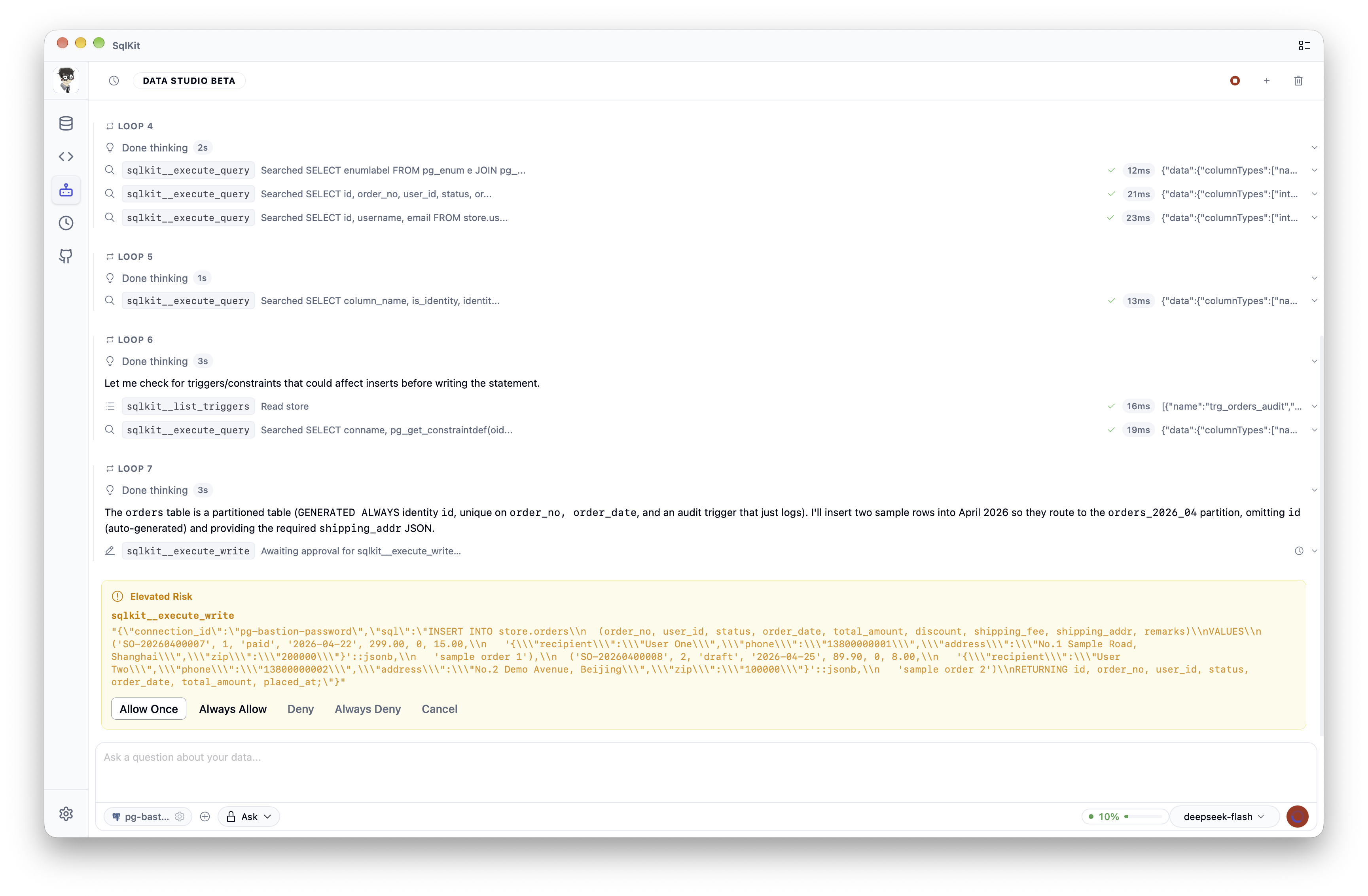
Switching to Auto never grants new permissions
Changing a session from Ask to Auto only skips prompts for permitted Elevated writes. It never allows an action denied by the connection policy or session restriction.
Review and retry a blocked action
- On a blocked action card in Data Studio, click Review permissions to check which connection and action category were denied.
- If the action should be permitted on that database, update the connection policy (for example, enable Create under Custom) or the session source settings.
- Save the change and click Retry request. SqlKit re-evaluates the policy before running the call.
Privacy & data boundaries
SqlKit never passes database passwords, SSH keys, or TLS private keys to LLMs or MCP clients. Schema metadata and query results returned by permitted tools go to your configured LLM (in Data Studio and the Queries sidebar) or back to the calling MCP client (which controls what it sends to its model). To keep sensitive databases offline, set them to No Access, or configure Ollama or LM Studio in Agentic Data Studio for local inference.
Next steps
Configure cloud or local models, context compaction, and custom prompts.
Register @geek-fun/data-studio-mcp in Claude Code, Codex, or Cursor.