
Schema browser, DDL & ER diagrams
Browse database structures in the Queries sidebar, inspect CREATE DDL for existing objects, build new tables visually with a live SQL preview, and map foreign keys on an interactive ER diagram canvas.
Database object browser
The left sidebar supports two browsing modes: an active-database selector and an expandable multi-database tree. Tree nodes match what the connected engine supports:
- Databases: create, drop, refresh, open a query tab, or launch an ER diagram.
- Schemas: shown on schema-aware engines (PostgreSQL, SQL Server, Oracle, Redshift, CockroachDB, Snowflake) and omitted on flat engines (MySQL, SQLite, ClickHouse).
- Tables: lazy-loaded per schema with an instant filter box.
- Views, stored procedures, and functions: grouped in collapsible tree sections plus a searchable Listing Tab where you can view DDL, copy names, rename, or drop objects.
Table context menu actions
Right-click any table in the object tree for direct actions:
| Action | Behavior |
|---|---|
| View Data | Opens the table's virtual-scrolled Data tab |
| View Structure | Opens the table directly on its Schema (Columns) tab |
SELECT TOP 100 | Generates a dialect-quoted preview query in a new SQL tab |
| Generate CREATE Script | Opens the DDL Viewer modal with the table's CREATE TABLE statement |
| Export Data | Opens the Bulk Transfer export wizard pre-targeted to that table Ultimate |
| Show ER Diagram | Launches the ER diagram for the enclosing database or schema Ultimate |
| Truncate Table / Drop Table | Executes after a destructive confirmation dialog |
Table metadata tabs
Every open table tab includes five views at the bottom with live item counts: Data (rows, search, SQL filter, row editing), Schema (column names, types, nullability, defaults, primary keys), Indexes (definitions, uniqueness, indexed columns), Foreign Keys (referenced tables, column mappings, update/delete rules), and Triggers (names, events, definitions where supported).
Visual Create Table & database creation
Visual Create Table dialog
Right-click Tables and choose Create Table to build a table visually. Enter the table name (and choose a storage engine such as InnoDB, MyISAM, MEMORY, CSV, ARCHIVE, or BLACKHOLE on MySQL-family engines), then add, remove, and reorder columns with:
- Column name and 27 common SQL data types
- Length and precision inputs for
VARCHAR,CHAR,DECIMAL, andNUMERIC NOT NULL, Auto-Increment (GENERATED ALWAYS AS IDENTITYor dialect equivalent), and Primary Key toggles- Default value expressions
A live CREATE TABLE DDL preview updates as you edit so you can review the SQL before running it.
Create Database, Create Schema & DDL Viewer
Create Database includes engine-specific options: Charset and Collation for MySQL-family databases, and Encoding and Locale for PostgreSQL-family databases. On engines that support them, Create Schema and Drop Database are available in the sidebar menu. Choose Generate CREATE Script or View DDL on any table, view, procedure, or function to inspect and copy its DDL.
Scope of visual schema editing
Visual dialogs cover creating databases, schemas, and new tables plus read-only inspection of existing columns, indexes, foreign keys, triggers, and DDL. Visual ALTER TABLE editing and schema diff generation are not included; run ALTER TABLE statements in the SQL editor to modify existing tables.
Interactive ER diagrams
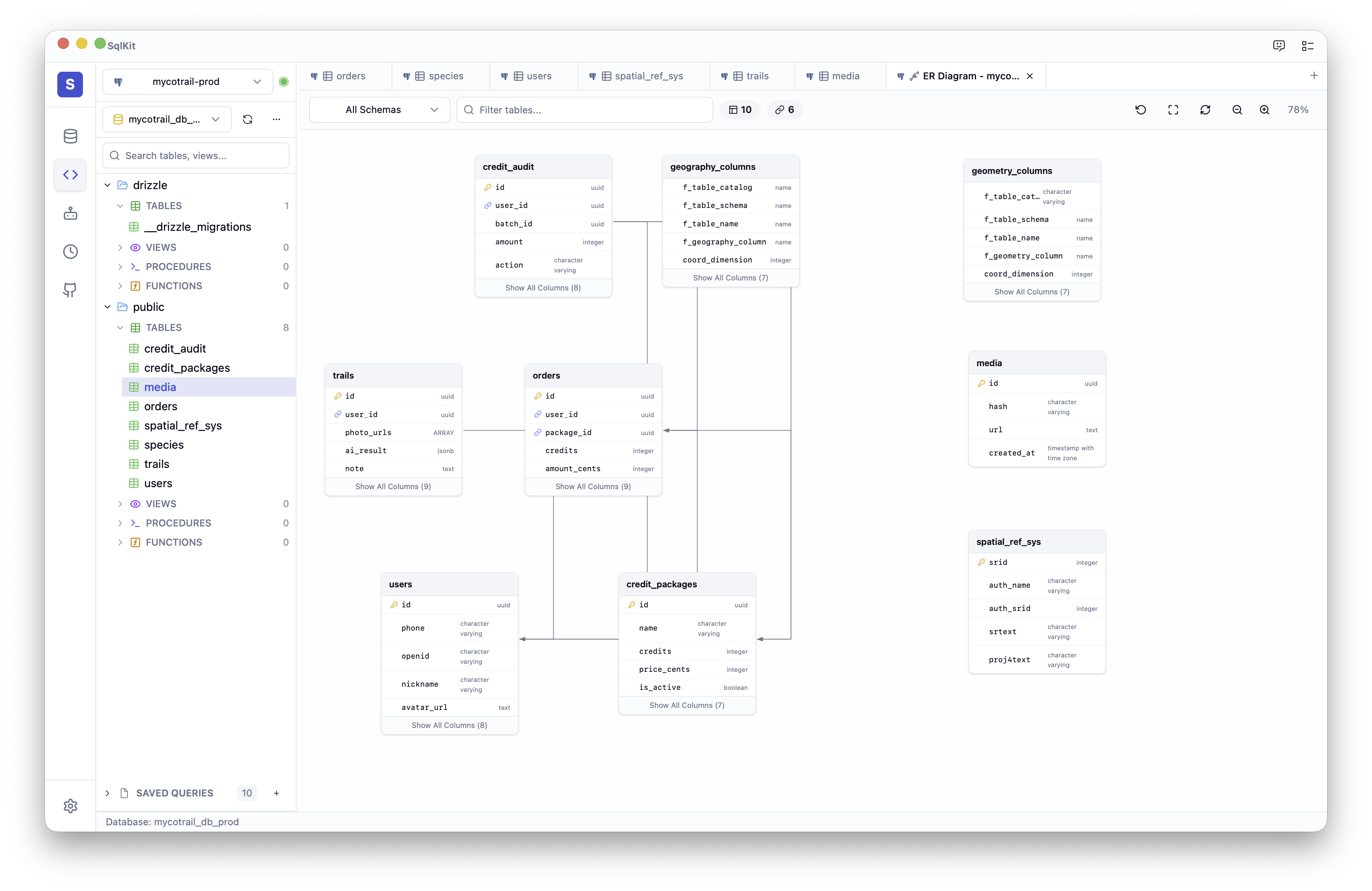
UltimateChoose Show ER Diagram from any database, schema, or table context menu to plot live table columns and foreign-key relationships on an interactive canvas.
Canvas navigation & exploration
ER diagrams use dagre for automatic layout with orthogonal SVG relationship edges. Drag any table card by its header to adjust positions (manual placements stay until you click Reset Layout), and drag empty canvas space to pan. Zoom between 10% and 300% using toolbar buttons, ⌘/Ctrl plus mouse wheel (cursor-centered), or trackpad pinch gestures, or click Fit to Screen.
Use the toolbar to filter by a single schema or view all schemas, search tables in real time, and see table and relationship counts. Table cards show the first 5 columns by default and expand on click. Clicking a table highlights its directly connected tables and foreign-key edges; double-clicking opens it in the Table Data Browser. Schemas with more than 30 tables ask for confirmation before running layout.
Where ER relationships come from
ER diagram edges come strictly from foreign-key constraints reported by the database (get_foreign_keys). Databases without foreign keys (such as Cassandra, ScyllaDB, ClickHouse, or schemas that enforce joins only in application code) show table cards with no arrows. Exporting ER diagrams to PNG or SVG is not currently supported.
Next steps
Double-click tables from the tree or ER diagram to filter and edit rows.
Ask AI to inspect unfamiliar schemas, trace joins, and draft SQL.