
MCP bridge & coding agents
UltimateSqlKit embeds a local HTTP MCP Bridge (built with Rust and Axum) so external coding assistants such as Claude Code, OpenAI Codex, Cursor, Windsurf, and OpenCode can query permitted SqlKit connections through Data Studio Agent (@geek-fun/data-studio-mcp).







Your coding client never sees database passwords, SSH keys, or TLS certificates. SqlKit handles connectivity, policy checks, and AST safety locally on your machine.
Prepare SqlKit
Verify Ultimate & saved connections
Open SqlKit, sign in with Ultimate (or an active 7-day trial), and confirm you have at least one tested connection saved under Connections.
Confirm the MCP Bridge is running
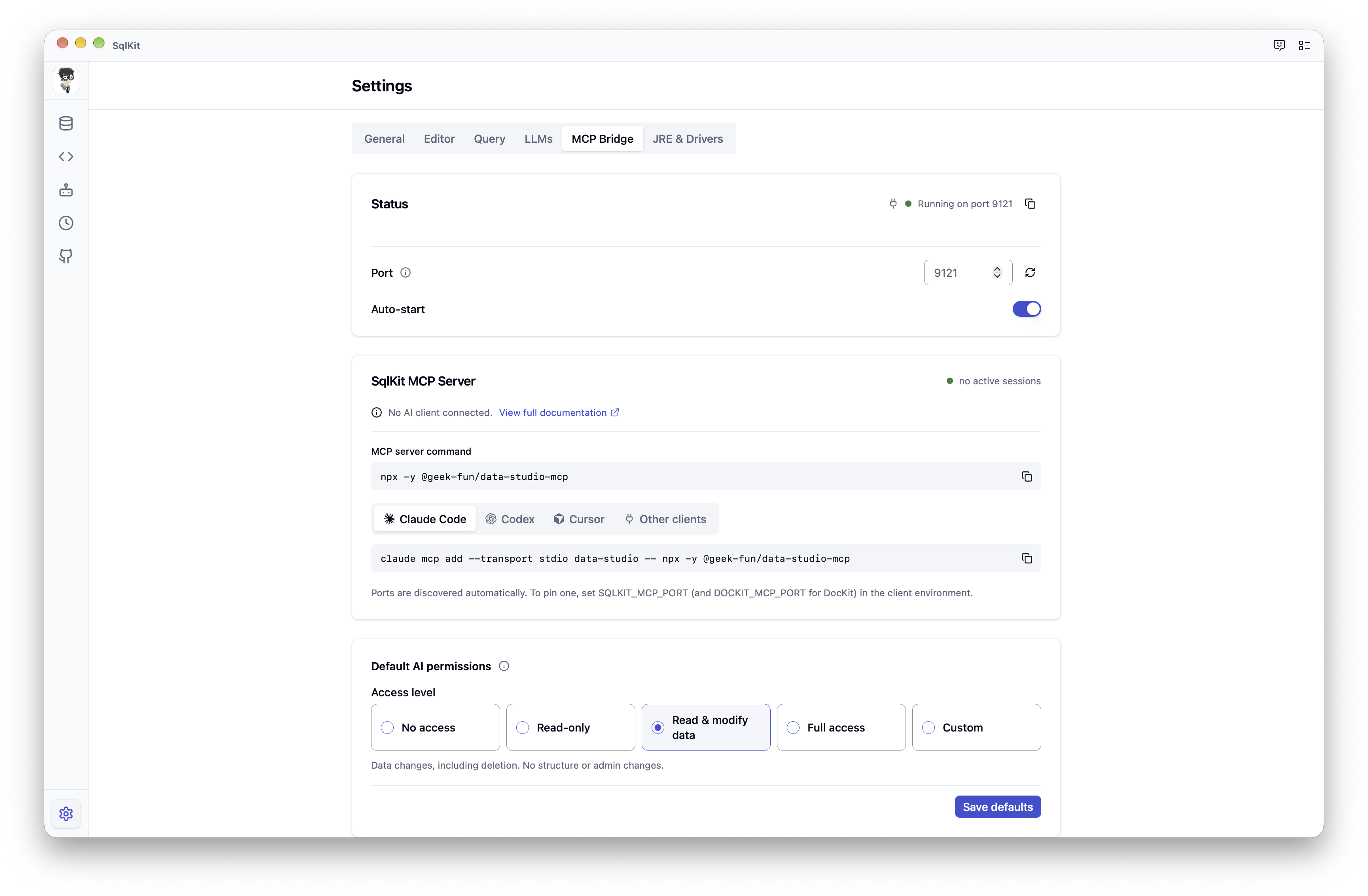
Open Settings → MCP Bridge and verify the status shows Running on port <port>. Use the restart button if needed. When Ultimate is active, the bridge starts automatically on launch (controlled by Auto-start) and stays running in the system tray or menu bar after you close the main window.
Set default & per-connection AI permissions
In Settings → MCP Bridge → Default AI permissions, start with Read (schema inspection and read-only queries). Check that the target connection's AI permissions also allow reading. Connections set to No Access do not appear in MCP discovery.
Check Node.js (npx) availability
Confirm Node.js 18+ and npm are installed on the same machine where your coding agent runs:
npx --versionRegister Data Studio Agent
Choose the configuration for your client (the same snippets are in Settings → MCP Bridge). npx -y fetches @geek-fun/data-studio-mcp on demand.
codex mcp add data-studio -- npx -y @geek-fun/data-studio-mcpclaude mcp add --transport stdio data-studio -- npx -y @geek-fun/data-studio-mcp{
"mcpServers": {
"data-studio": {
"command": "npx",
"args": ["-y", "@geek-fun/data-studio-mcp"]
}
}
}- Codex: run
codex mcp listto verify thedata-studioentry. - Claude Code: run
/mcpinside a session to check server status. - Cursor: add the JSON block to
.cursor/mcp.json(project) or~/.cursor/mcp.json(user), merging into an existingmcpServersobject if present, then reload MCP servers. - Windsurf, OpenCode, or other stdio MCP clients: configure command
npxwith args["-y", "@geek-fun/data-studio-mcp"], or see the Data Studio Agent quick start.
Verify the connection & monitor sessions
- In your coding agent, ask: "List the accessible SqlKit connections, then list the tables in
<your-dev-connection>without modifying any data." - Confirm the tool returns safe connection metadata (ID, name, database type, never credentials) followed by the table list.
- Open Settings → MCP Bridge (or click SqlKit's system tray or menu bar icon) to see active client sessions (client name, version, 30-second heartbeat TTL) and copy the Bridge URL.
Registered MCP tools (25 capabilities)
All 25 tools are shared across the MCP Bridge, Agentic Data Studio, and the Queries AI Assistant sidebar, split by risk tier:
| Category | Tools | Permission required |
|---|---|---|
| Discovery (1) | sqlkit__list_connections (returns id, name, type only; never passwords) | At least one allowed action |
| Read & Schema Inspection (16) | sqlkit__execute_query (AST-verified read-only SELECT/SHOW/EXPLAIN), sqlkit__list_databases, sqlkit__list_schemas, sqlkit__list_tables, sqlkit__get_schema, sqlkit__describe_table, sqlkit__explain_query, sqlkit__list_indexes, sqlkit__list_foreign_keys, sqlkit__list_views, sqlkit__list_procedures, sqlkit__list_functions, sqlkit__list_triggers, sqlkit__get_object_ddl, sqlkit__get_table_info, sqlkit__get_foreign_keys | Read |
| Write SQL (1) | sqlkit__execute_write (INSERT, UPDATE, MERGE) | Create / Update |
| Destructive SQL (2) | sqlkit__execute_delete (DELETE, TRUNCATE), sqlkit__execute_ddl (CREATE, ALTER, DROP) | Delete / Manage |
| DBA & Operations (5) | sqlkit__list_sessions (Read), sqlkit__get_slow_queries (Read), sqlkit__kill_session (Manage), sqlkit__grant_privilege (Manage), sqlkit__revoke_privilege (Manage) | Read or Manage |
See the Data Studio Agent tool reference for full parameter schemas.
Troubleshoot the bridge
| Symptom | What to check |
|---|---|
| Coding client cannot launch the server | Confirm npx is on the PATH visible to your IDE or CLI and that npm can download @geek-fun/data-studio-mcp. Reload the client after changing MCP config. |
| MCP server starts, but reports SqlKit unavailable | Make sure SqlKit is running (window open or in the system tray), Ultimate is active, and Settings → MCP Bridge shows Running on port. Both the coding client and SqlKit must run on the same machine for local discovery. |
A saved connection is missing from list_connections | Check the connection's effective AI permissions. MCP discovery lists only connections with at least one permitted action. |
| A query or schema change is denied | Check the connection's AI policy (Create, Update, Delete, Manage) and confirm the database login itself has the required privileges. |
Next steps
How AST write guards and per-connection policies protect production.
Step-by-step blog guide with screenshots for connecting OpenAI Codex.